The biologists and
the programmers: trials of a biologist trying to write computer programs
Almost all biologists nowadays use computer programs. Somewhat fewer, but still a large number, including me, are involved in writing them.
Why should one write computer programs, particularly when there are so many already out there that seem to do practically everything. I’m thinking here primarily of examples where you have a batch of data to analyse. My main argument for writing your own program is that using someone else’s will inhibit your thinking, taking you down the path that the program writer has designed rather than doing what you might want to do yourself.
You might think that it is likely that your data will fit into some pre-existing framework where an analysis program has already been written. It is true that standard analysis programs do amazingly complex things, but in my experience there is often something to check that programs don’t obviously cope with. Rather than spending time trying to understand what different programs do, why not try to write it yourself? If you like playing computer games, I think you’ll enjoy programming. Just as there is a buzz for getting a game out, so there is one for getting a program to work and seeing actual output.
I’m writing this with the inflated opinion that my program writing experience, which is now more than 50 years, may be of some use. But don’t bother to read this if you are an experienced programmer yourself, because you will already know the value of writing your own programs and my opinions won’t add much.
There’s one caveat to this idea of writing your own programs, a rather nasty one. I’ll leave that to the end.
Who are biologists
and who are programmers?
Can one be a biologist if, like me, one doesn’t know the difference between a sepal and a petal or doesn’t know whether elasmobranchs are arthropods or mammals? It may seem like stretching things, but if one is in a ‘Biology Department’ at a university, then what else should one call oneself? I’m really a geneticist, but there is almost no such thing any more as a ‘Genetics Department’. And there are many others with a non-traditional background working in biology. Obviously my experience will be more appropriate for some than for others.
Computer programmers inhabit a different world. They are brought up on ‘Algorithms’, ‘Object-oriented programming’, ‘Pseudocode’ and other concepts. Not being one of them, I don’t really understand the sub-divisions amongst programmers. And maybe there are people who understand all of these things as well as the biology. My congratulations if so.
‘Command line’
programming versus GUI programming
The majority of programs nowadays are menu-driven or run from clicking on buttons. Such GUI (Graphical User Interface) programs are difficult to write (see the next section). But if you’re writing a program to do some data analysis, you won’t need any of this point and click stuff. All you need is a data file, and a program to analyse the data and print out the results. But you also need to be able to activate that program, usually using a ‘command line’.
Command line programming used to be complicated, because it depended on the computer being used. Different companies had different ‘operating systems’ for their computers. Fortunately a single operating system, Unix, seems to be almost universal now, so one needs only know a few Unix terms.
Virtually all computers now understand Unix. It’s the basic operating system of OSX on the Macintosh, although this is hidden beneath several layers. But click on the Terminal icon, and the computer becomes a Unix computer. On the PC, Linux is the Unix-based operating system. I presume that there is also some way of executing Unix commands under Windows.
GUI programming
I thought it might be worth a small aside on some principles of GUI programming. The Macintosh introduced the essentials of GUI programming, the mouse, buttons, menus, icons etc when it came out in 1984. Actually the Mac was preceded by a computer called the Xerox Star, which sold, or failed to sell, for around $30,000, and then the Lisa, a rather ugly and expensive computer from Apple based on similar principles.
I was immediately attracted to the Mac, and naturally wanted to know how to program it. The operating system was written in Pascal, with which I had some experience, so I tried to plunge in. I failed totally, perhaps not helped by the fact that the system was in its early days and the manual was incomprehensible. It was only after the introduction of a very helpful add-on programming system called FaceWare that I was able to make any progress.
The basic difficulty of GUI programming reflects the fact that the user in now in charge rather than the programmer. A command line program will usually leap into life as soon as it is activated and perform certain actions or ask the user for a particular input. A GUI program, on the other hand, does nothing unless it is asked to do so. It has to be prepared to examine each form of input, whether from clicking on a button, accessing a menu or keyboard entry, and then respond appropriately. It’s much more complicated, initially requiring the program to cycle through an endless giant loop continuously looking for some input event. And then, of course, the program has to know how to draw on the screen, manipulate windows etc.
The language of choice for GUI programming seems to be some variant of C, usually C++. If you’re doing command line programming, however, old-fashioned C is all you’ll need. This is vastly simpler, although see below for some difficulties. On the Mac, a new language called Swift has been introduced to replace C. According to Apple, this is “powerful and easy to use, even for beginners”, although I’d take that with a grain of salt. There is also Java – see below for some comments.
Choice of programming
language
The most important way of avoiding tricky programming concepts is the choice of language. My experience is with Fortran, Basic, Pascal, C and Python. I started with Fortran, which was the first and only language available in early mainframe computer days. Basic was a similar language – Bill Gates made his initial fortune with Basic for microcomputers. Pascal then seemed a programming revelation to me when it came out. But nowadays neither Fortran nor Pascal are mainstream, sometimes referred to as ‘heritage languages’. Pascal still survives in Delphi for Windows programming and a much enhanced version of Fortran still rules in a lot of engineering calculations.
Unfortunately what is the easiest and best supported programming language at some time will not necessarily be the best at some time during the future. Each of the above seemed best at the time. And occasionally events happen such as the change on the Mac from OS9 to OSX, after which everything essentially has to be re-written.
Most of what I have to say below is on C and Python. One big advantage of these computer languages is that they are both public domain, in the sense that they can be used on most systems for no cost.
The R programming
language
I need to put in a mention for this language, which seems the language of choice for biologists doing statistical calculations. This is not a ‘low level’ language like the ones mentioned above, but does things like matrix manipulations very easily. I’ve had limited exposure to R and can’t really say anything useful about it. The same goes for Matlab, a commercial product that seems to have admirers.
Python versus C
I use Python as much as possible nowadays. It copes with data files more easily than anything else I have tried. One downside of Python, however, is that it is an ‘interpreted’ language. As I understand it, this means that the computer has to decide how to implement a line each time it comes to it. I’m always impressed how fast Python is for analysing data files. But for simulations, when a given operation has to be carried out thousands or millions of times, there are advantages to C, which is a ‘compiled’ language that speeds things up a lot. There’s something called Cython, which supposedly lets you run C-speed while writing in a kind of Python language, but I haven’t tried that. Not enough neurones or hours in the day.
Two nice things about Python compared to C. The first is that it uses ‘indents’ in an intelligent way. For example, to add up the sums of squares of all numbers from 1 to 100, one could write:
sum = 0
for i in range(1, 100):
j = i * i
sum += j
The fact that the last two lines are indented in the same way means that both are treated as part of the same ‘loop’.
With C, one would write:
sum = 0
for (i=1; i++; i <=100)
{
j = i * i;
sum += j;
}
The main difference is probably not obvious here, but becomes clearer in larger real programs, the use of indents in Python versus { and } brackets in C. There is only one level of ‘looping’ here, but when there are multiple levels it becomes increasingly difficult in C to see which close bracket ‘}’ corresponds to which open bracket ‘{‘. So as far as I can see, most C programmers indent the code to make it readable to a human, but then have to use ‘{‘ and ‘}’ anyway since the C compiler doesn’t recognise indentation. All those useless brackets.
There’s a second thing about C, the use of semi-colons to end a line of code. In this simple C program it is not really necessary to end the last line with ; but most lines need them. All those useless semi-colons, when one statement per line ought to be enough.
The last thing I’d like to mention in the comparison of C and Python, and the major advantage if Python in my opinion, relates to the question of ‘array bounds’. What happens if one is looking at the weights of our 10 animals and asks for the weight of animal number 10. A stupid thing to do, since the animal numbers range from 0 to 9. But my experience in programming is that I make stupid mistakes all the time. I suspect that I’m not alone in this, and I’ve even heard it said as a rule that no program works the first time.
C and Python handle this problem in different ways. Python will stop the program and announce that an error has been made, showing where in the program. This can be a pain, because it is often difficult to tie down the mistake, but at least you know that there is a problem. C, on the other hand, will simply take whatever happens to be stored in the computer in the next memory location, and use that. Maybe it will be obvious that this is not a sensible value, but maybe not. Perhaps there are versions of C that do check to see whether one has overrun the bounds of the array, but in my experience C systems don’t do this. I don’t understand how people can trust large programs written in C unless they are rigorously checked for such errors by other means.
0-based versus
1-based calculation
The original programming language, Fortran, introduced the concept of an ‘array’ which is a set of numbers or properties. For example if one wants to store the weight of 10 animals, one would set up an array, maybe called weight, with elements:
weight[1], weight[2], weight[3] …. weight[10]
There could be any number of elements in the array, but Fortran specified that the first element in the array must be 1.
It’s not obvious with this example, but sometimes an array needs to have a zero element, which in this case would be weight[0]. A friend of mine, who was initially a Fortran programmer, once told me that the absence of a zero element cost him a year of programming time.
Later languages such as C and Python solve this problem by making it difficult to start arrays from elements other than zero. Often the array number comes from a calculation rather than a fixed number, and it turns out that it is easier to do the arithmetic if the first element in all arrays is given the designation zero.
But there is a downside to this, at least from the point of view of a biologist. We tend to think in terms of real numbers, and it is often confusing to have to label the weights of our 10 animals as weight[0], weight[1], weight[2] …. weight[9]. Figure 1 shows what happens in practice. It sometimes makes things confusing.

Figure 1. A population of 10
‘animals’. But where is
animal number 10?
Another downside to this numbering system that starts from zero can be seen from the little Python program I showed earlier:
for i in range(1, 100):
………………
Those who have used Python will know that the last number in an array or loop is one less than the given bounds, so that in fact this program will only sum the numbers from 1 to 99. Typically one uses the simpler statement:
for i in range(100):
and what this would do is sum 100 numbers, but from 0 to 99 rather than 1 to 100.
Similar problems arise in the analysis of molecular data. Figure 2 shows a typical output from a ‘BLAST search’, lining up two DNA sequences against each other.
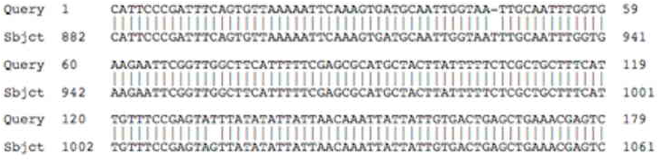
Figure 2. BLAST output from aligning two sequences
Note that the first sequence starts from 1 rather than 0. Molecular biologists think the same as any biologist in counting nucleotides. But what happens if one wants to store these sequences in an array to do some additional calculations, eg to translate the sequence into protein. The natural way to store the sequence in an array is to store the first nucleotide in array element 0, the second element in array element 1 etc. Any subsequent calculations then need to take account of this difference of 1 between the array element and the nucleotide number. And of course if one is doing something like an in silico translation of the sequence, forgetting this difference potentially leads to a garbage result.
Reading data files
As mentioned earlier, I’m very impressed with the ease of reading data files in Python. I should add that Perl also copes with similar tasks, although I found the syntax much more obscure than Python. I believe that the Ruby language functions similarly, although I haven’t used that.
It shouldn’t be the case, but frequently even Python programs fail because a data file has does not have a line feed on the last line or maybe has an extra blank line at the end. There are also issues to do with the use of different ways of marking line feeds, sometimes the ASCII character 10, sometimes 13 and sometimes both. It’s possible to write programs that cope with all such eventualities. But if you’re writing a program to analyse your own data you often won’t realise that other batches of data may be different. It seems almost guaranteed that a new batch of data, especially if it comes from somewhere else, will crash a program that has only been tested to a limited extent.
What about java?
There is a programming language called java, not to be confused with javascript which is a much simpler programming language for web browsers. I believe that one great advantage of java is that it eases the problem of having the same program running under different systems, eg Mac and Windows. I have used a couple of java programs written, I believe, by biologists rather than professional programmers, and I can only profess my admiration for the writers.
When java first came out it was strongly promoted, and I felt that I should give it a try. I got as far as page 2 in the manual when I came across the statement: “There are no global variables in java”.
It probably needs a bit of explanation as to why I got no further than page 2. Computer programs can be huge, thousands of lines or even hundreds of thousands. So it is necessary to break them up into smaller units, most of which just achieve one task or implement one set of commands. These units are called routines, subroutines or procedures in different languages.
Say that one has a sequence that has to be analysed in two different routines. One gives it a name, say ‘sequence_x’, and then does something with it in the first routine and something in the second. But for this to work, the name ‘sequence_x’ has to be recognised in both or all parts of the program, ie it has to be a ‘global variable’.
Why would one want a rule that specifies that there are no such variables that are recognised throughout the program? I suspect that one reason is that most large programs are written by teams rather than just one person, which makes it important to know that someone hasn’t taken ‘your’ variable and done something strange with it in another part of the program.
What about if you are writing the whole program yourself. Is this a sensible restriction? It seems not to me. Initially I could not see how one can ever write anything in java, although eventually I could see that it can be done. Not by me though.
Programs shouldn’t
try to do too many things
You’ll often see the term ‘pipeline’ used to describe programming solutions. What this means is that one program does a calculation, the results are fed into a second program, those results into a third etc. There are considerable advantages to breaking up calculations in this way, because the process can easily be tested at each step along the way. If necessary, the different steps can eventually be automated rather than manual running of one program after the other.
As an example, I’ve recently written a set of programs to analyse a batch of DNA sequence outputs to produce a genetic map. This required 12 different programs, each of which produces an output that can be passed on to the next program.
Each of these outputs is a ‘text file’. Such files usually contain multiple rows and columns. By putting in ‘tab’ marks in the output, such files can be examined using a program such as Excel, which I find excellent for such inspection. Excel is almost never part of the analysis, although it can be used at the end of the process to graph results. But it is invaluable for inspecting intermediate files. It can also be used to manipulate them, provided the output is saved as ‘Tab Delimited Text (.txt)’.
Writing programs for
others to use
If one is motivated to write a program for others to use, this usually requires a lot of documentation. Or at least it ought to. My experience in trying to use such programs is that it is frequently not easy to follow what the author requires.
I like to compare the use of gaming programs against biology
analysis programs. The former are
designed so that anybody can use them.
The latter, not so much. The basic difference, I suspect, is
money $$$$. I’ve written a bit
about this in an article in Genetics 185: 1537–1540 (2010)
There’s potentially a lot of money in writing gaming programs but little or none in writing analysis programs, or teaching programs for that matter. Not something that those of us who have day jobs teaching or researching, can complain about. But there’s a definite expectation that programs and data on the internet will be free. I admire hugely those people involved in pubic domain projects such as Python, Latex, Wordpress etc, There’s an organisation called the Free Software Foundation dedicated to such projects, perhaps in response to rip-off companies such as Microsoft and Apple. But at the same time I feel that it is downgrading the contribution that programmers make. I suspect that you wouldn’t find an organisation dedicated to providing free accounting for everybody. Unfortunately the end result of the lack of money is a big difference in the standard of the offerings in gaming programs versus the sorts of programs being discussed here.
Learning programming
languages
Most languages come with elaborate manuals, either printed or online. Online manuals have the advantage that slabs of code can easily be highlighted and copied to try in a program. Some printed manuals give access to code examples to avoid having to write out the code.
Frequently, once you have started writing, you will come to a place where you have made an error or don’t know how to proceed. This means either going back to the manual to look at the command in question, or Googling to find an example where someone has asked the same question. It surprises me how often the latter is the easier way to go. Maybe not very intellectually satisfactory, but that’s the way of the world now.
The downside of
writing your own program
The downside, a serious one, is that nobody will believe your results. Maybe with good reason, because it is very easy to make mistakes when programming. You will usually have to do something like analysing a known or very simple data set to prove to yourself, if not to others, that the program does what it is supposed to do.
A related problem is that you will have difficulties in getting work published if you don’t use the reviewer’s favourite program. It often seems that there is a set of programs that one is expected to have run in any given instance. But I find it astonishing how little attention is paid to the possibility that a particular program has been misapplied. Just throw in the name of the program and some conclusion. This will probably be accepted with far less critical examination than results that you have obtained yourself and understand better than somebody who has just used a canned program without really knowing what it does.
Sound like sour grapes? It probably is, but it’s a real problem.